I am the ghost of groovymother.com. Woooooo!
This is an old page from Rod Begbie's blog.
It only exists in an attempt to prevent linkrot. No new content will be added to this site, and links and images are liable to be broken. Check out begbie.com to find where I'm posting stuff these days.
Filed under 'osx'
➠ June 20, 2012
➠ June 7, 2012
➠ October 13, 2011
➠ May 17, 2011
screenstagram
OS X screensaver that shows your friends’ Instagram shots. Lovely!
➠ March 7, 2011
Rdio for Mac
Rdio have launched their (mostly-)native Mac client, and it’s grand. Not as nice as Spotify (playlist building is still clunky), but it does 99% of everything you want. I’ve been using it for a few weeks, and it was the sole reason I resubscribed.
➠ January 25, 2011
➠ July 22, 2010

➠ June 1, 2010
Kaleidoscope — File comparison for Mac
New diff viewer for OS X. Finally, a diff tool that can deal gracefully with changesets across multiple files!
➠ May 12, 2010
Portal is FREE!
The free game is not a lie! To encourage download of Steam, Valve is giving Portal away for free for the next two weeks. If you haven’t already played it, YOU HAVE NO EXCUSE NOT TO.
➠ March 8, 2010
Valve Brings Hit Games, Steam Service to Mac
This is a big shift: “We are treating the Mac as a tier-1 platform so all of our future games will release simultaneously on Windows, Mac and the Xbox 360.” I will never need Boot Camp again.
➠ December 7, 2009
MagicPrefs
I love my new Magic Mouse, but was missing my middle click. This app adds it back. Hooray!
➠ November 25, 2009
➠ October 6, 2009
➠ August 21, 2009
Date & Time
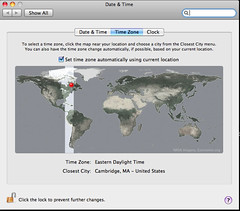
Opened up the laptop in Cambridge, and noticed my laptop's timezone had already been set.
Witchcraft!
➠ July 28, 2009
➠ July 23, 2009
ClickToFlash
OS X Safari users: Install this! Blocks Flash until you click on the object in Safari (and other WebKit-based applications). A way to mitigate the risk of the Flash exploit without completely nuking Flash Player from your machine.
➠ June 25, 2009
The four most important buttons on my Dashboard
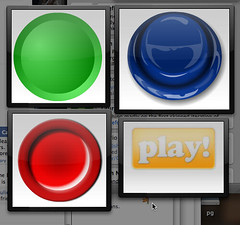
The single-serving-site loveliness of Instant Crickets, Bom Bom Bom Bom Wooo, Instant Rimshot and Sad Trombone, clipped to my OS X dashboard for those times they're urgently needed.
➠ April 20, 2009
atebits - Tweetie for Mac
Tweetie has been my iPhone Twitter app of choice for some time. The new OS X version seems equally lovely. Not going to tear away folks with seven-column Tweetdeck setups, but it seems to be a good step-up from Twitterrific.
➠ March 18, 2009
➠ February 20, 2009
➠ February 2, 2009
“You must allow Google Software Update to run in the background on your computer.”
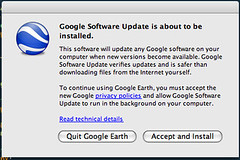
The latest version of Google Earth requires you install a mysterious new background process to your Mac before you can use it.
The words "fuck that shit" spring to mind. This is a dick move in the style of all those fucking annoying updates that keep getting installed in Windows system trays by douchebag invasive packages (Java, Adobe Acrobat, et al), wasting cycles.
I hit "Quit", and am waiting for someone to post a workaround before I'll consider playing with the new version of Google Earth.
(Updated to add: Apparently, I should be grateful they chose to prompt me before installing the process.)
A Review of Two Things: One For the Mac and One For iPhone
Things has completely changed my life. My moleskine has laid dormant for months, no longer the recipient of a gajillion TODO lists. And, as Shaun Blanc points out, the interface is a near total delight. Dragging a TODO into the project section to split it up into subtasks is the kind of intuitive action that makes it ace. If only it had MobileMe syncing, instead of custom-over-wifi and Dropboxery.
➠ January 27, 2009
➠ January 4, 2009
➠ December 20, 2008
➠ November 24, 2008
AddressBookSync | Facebook Picture Synchronization with OS X Address Book
Update your OS X Address Book with photos and birthdays from your friends’ Facebook pages (sadly, Facebook bars it from doing anything useful, like updating email addresses and phone numbers)
➠ October 23, 2008
➠ October 8, 2008
➠ October 4, 2008
➠ September 23, 2008
➠ August 20, 2008
Things - task management on the Mac
I will confess to having fallen somewhat head-over-heels in love with Things as a TODO list manager over the last couple of days. Requires some light symlinking-to-an-iDisk to “sync” across machines, but offers the right levels of “This is a task for today/soon/sometime” to help keep me organized. Next step: Play with the iPhone app.
➠ July 24, 2008
Silverback: guerrilla usability testing
Pretty damned nifty usability-testing app for OS X. With an *awesome* icon. Similar to (and considerably cheaper than) the Windows app Morae.
➠ July 8, 2008
The Greatest Bug of All
Or “Why you need to understand operating system fundamentals if you want to ship end-user software”
➠ June 23, 2008
firefox-mac-pdf
In ye olde days, displaying PDF documents in the browser drove me nuts. You’d unwittingly click on a link, and your entire web browser would freeze up for 30 seconds while Adobe Reader started. But since PDF is baked so closely into the OS X system, this Firefox plugin is wicked fast, and thoroughly helpful.
➠ June 9, 2008
PhoneFinger
Testing tool for iPhone development — Replace your mouse cursor with a lifesize finger. Needs a dirty-fingernail easter egg, if you ask me.
➠ May 21, 2008
➠ May 17, 2008
➠ May 14, 2008
➠ May 12, 2008
tms - Command line client for Time Machine backups
Command line tool for interrogating and diffing Time Machine backups.
➠ May 9, 2008
TapeDeck. ▸▸ The tape recorder…fast-forwarded to Mac OS X.
Graphically lovely, and drop-dead simple, audio recording app.
➠ March 26, 2008
Crossover Games
Wine for OS X and Linux especially designed to play graphically-intensive Windows games. The Orange Box and its contents are supported, and Audio-Surf ran OK for me, with some minor resolution-based oddness. Not sure it’s worth $40, though, when I can just reboot to Boot Camp.
➠ March 21, 2008
Vote for virtualization
I rely on virtual machines for testing Windows code — I cannot fathom how Mac developers can possibly be expected to deliver quality applications without snapshotting and rolling back OS images.
➠ February 26, 2008
Winclone
I bought a new laptop drive for my MacBookPro last week, and with SuperDuper, was able to copy my OS X partition and boot off it within hours. The Boot Camp Windows partition, however, stumped me. No amount of disk copying or dd’ing worked.
This tool did. It does all the magick required to successfully copy a Windows partition and tweak the partition table to make Windows boot again. Hurrah!
➠ February 22, 2008
CoverSutra
Got this as part of MacHeist recently, and dismissed it as “pointless eyecandy”. I couldn’t be more wrong — While it is graphically-lovely, it allows for keyboard control of iTunes (including tasks like rating tracks) and is a lower-memory last.fm client than the official last.fm client. Added to my Login Items!
➠ February 14, 2008
Vara Software : ScreenFlow
Really rather sweet Mac screencasting software. The post-capture editing tools look handy.
➠ February 6, 2008
TrueCrypt - Free Open-Source On-The-Fly Disk Encryption Software
The excellent TrueCrypt now runs on OS X, as well as Windows and Linux. I’ll definitely be shunting some of my files onto an encrypted thumbdrive later.
➠ February 5, 2008
➠ January 25, 2008
➠ January 14, 2008
Shelf - jerakeen.org
Cool prototype application by Tom Insam which monitors your foreground application in OS X, and tries to provide you some context by matching it to someone in your Address Book. It’s early days yet, but decidedly cool (and written in Python)
BusySync 2.0
BusySync 2 will synchronize between Google Calendar and iCal in both directions. Unless Apple announce this exact feature at Macworld, I’ll be buying a copy forthwith.
➠ January 13, 2008
➠ December 26, 2007
SpiderWorks: Learn Objective-C on the Macintosh by Mark Dalrymple and Scott Knaster
I’m giving Mac programming a go over the festive break — This seems to be a good (cheap) e-book to get me started with Objective C.
➠ December 19, 2007
➠ December 15, 2007
Macworld | Mac OS X Hints | Add more power to 10.5's screen sharing
OS X’s VNC viewer is possibly my most-used new feature in Leopard. Here’s a handful of tweaks to make it even more awesome.
➠ December 14, 2007
appscript
Control AppleScript from Python. The prospect of using Python to hack on my iTunes library is massively exciting!
➠ December 9, 2007
➠ November 22, 2007
➠ November 6, 2007
Synthesia, Piano for Everyone
The project formerly known as “Piano Hero”.
➠ September 4, 2007
Jing Project: Visual conversation starts here. Mac or Windows.
Cool looking little screencast app from TechSmith — An easy way to grab images or video from your desktop, and share them quickly. Works in OS X and Windows.
➠ August 28, 2007
Mac OS X 10.5 Leopard (9A527) Gallery | Finder020.jpg
Apple make good use of their new high-resolution application icons in OS X Leopard. “Here’s to the crazy ones…”
➠ August 22, 2007
➠ August 14, 2007
➠ August 8, 2007
➠ August 4, 2007
A Few Command-Line Party Tricks - MacResearch
Some very cool OS X command-line utilities I never knew existed.
➠ August 2, 2007
Remote Buddy > iPhone support
The excellent Mac remote control software adds an AJAX web-server designed for the iPhone. It works a treat for the old Mac Mini I keep under my TV.
➠ July 30, 2007
➠ July 27, 2007
➠ July 5, 2007
➠ June 25, 2007
OliveToast MiniMail
Lovely little email floater for Apple Mail.
➠ June 24, 2007
Friend Photos - Facebook Screensaver
OS X screensaver which grabs your friends’ photos from Facebook. Playing with this, I was reminded that a) I have some incredibly hot friends and b) I have some incredibly strange friends.
➠ June 19, 2007
Versions - Mac Subversion Client
“Versions is the first Mac OS X Subversion client that won’t make you long for the command line interface anymore.”
➠ June 16, 2007
VMware Fusion Overview
If you don’t already own Parallels Desktop, the new VMWare beta is great — I far prefer “Unity” to “Coherence” for mixing Windows apps on the OS X desktop. Only $40 if you buy before the official release at the end of August.
➠ June 14, 2007
➠ May 22, 2007
Medallia Blog: jQuery Reference Widget
Dashboard widget for the JQuery docs.
➠ May 18, 2007
➠ May 16, 2007
➠ May 15, 2007
➠ May 6, 2007
MailActOn
Plugin for Apple Mail which allows you to quickly tag/file/act-on your emails with a couple of keystrokes. I’d been looking for something like this for a while.
➠ May 2, 2007
Wakoopa - Software gone social
Social site tracking what applications you use and how long you use them for. Kind of a Last.FM meets IUseThis.
➠ April 26, 2007
➠ April 23, 2007
Panic - Coda - One-Window Web Development for Mac OS X
Panic’s newest app is aimed squarely at web-devs, attempting to roll “all” the stuff you need to build a website into one app. Looks interesting — I’m definitely guilty of needing about 7 windows open to do web development (a couple of TextMates, Firefox, Safari, a terminal or two). It’ll be interesting to see if this can bring it all together for me.
➠ April 12, 2007
➠ April 1, 2007
iusethis mac software: applications used by rodbegbie
Up-to-date list of the software I use on my Mac.
➠ March 28, 2007
➠ March 25, 2007
Products > Remote Buddy
Tool to enable use of the Apple Remote in more apps than just Front Row on OS X. I hooked my old PowerPC Mac Mini up to a USB IR receiver, and can now control VLC with the Apple Remote that came with my MacBookPro. Hoorah! Well worth €10.
Billable: Simple service and invoice tracking for Mac OS X.
Nicely-done OSX app to help you keep track of your hours and invoicing when doing freelance work.
➠ March 23, 2007
➠ March 16, 2007
➠ March 14, 2007
Capture a Screencast with a Mac
Tools to help you create a screencast in OS X. Some of them also look like they’ll be handy when doing a live demo.
➠ March 12, 2007
➠ March 7, 2007
Screencast on Quicksilver's "Comma Trick"
Didn’t know you could do this with QuickSilver. Those Windows apps that try to clone just the program launching part of QS are really missing the beauty of the app.
➠ March 2, 2007
A faster way to speed up Mail.app
Since Apple Mail uses the opensource sqlite for its data repository, you can speed up Mail by running a SQL vacuum on the index file.
➠ February 18, 2007
➠ February 2, 2007
Bill Gates on Vista and Apple's 'Lying' Ads - Newsweek Technology - MSNBC.com
Bill Gates trolls the Apple fanboy. “Nowadays, security guys break the Mac every single day. Every single day, they come out with a total exploit, your machine can be taken over totally. I dare anybody to do that once a month on the Windows machine.” I had to double-check this wasn’t some “Fake Steve”-style spoof!
➠ January 11, 2007
CrashPlan
Impressive looking network backup software. Straightforward to set-up, you can either pay CrashPlan to backup to their servers, or use local or friends’ hard drives for free. Lots of nice touches, like using Bonjour to discover local backup destinations automatically. Once the Linux client is ready, I’ll be in heaven.
➠ January 4, 2007
Wormux
Open source Worms-a-like. Far too many of my student hours were taken up playing “Worms 2” against my flatmates. Admittedly, most of that time was taken up by giggling as we named our worms things like “Sean Is A Virgin” and “Jim’s Cock”, but I think the game was fun too.
➠ January 2, 2007
➠ December 13, 2006
➠ December 7, 2006
➠ December 2, 2006
Parallels Desktop New Coherence Feature
The latest beta of Parallels Desktop for OS X allows you to seamlessly display windows from, erm, Windows on your OSX desktop. This is very cool stuff. Makes me wish I had an Intel Mac to try it out on.
➠ November 23, 2006
➠ November 2, 2006
Boing Boing: Apple to add Trusted Computing to the new kernel? (July 2005)
Cory Doctorow’s spectacularly pant-pissy and, with hindsight, almost 100% inaccurate flameout about Apple including a TPM module. I wonder if he’s had the tattoo lasered-off yet.
Trusted Computing for Mac OS X
Really interesting article on the TPM “Trusted Computing” chip inside some Intel Macs. Explains in detail that TPM != Microsoft’s evil Palladium scheme, and that the chip (which is not in newer Macs) can’t even be accessed without special device drivers.
➠ October 30, 2006
➠ October 26, 2006
➠ September 25, 2006
Comic Book

Passing the time at the Cambridge Apple Store, playing around with the "Photo Booth" software on the Macs.
➠ September 3, 2006
➠ August 7, 2006
Apple - Apple - Mac OS X - Leopard Sneak Peek - Time Machine
Most of the Apple stuff announced today was fairly unexciting. Nice improvements, but not revolutionary. But this, their constantly rolling system backup looks brilliant. The UI, if it works as advertised, is genius too.
➠ July 19, 2006
➠ July 4, 2006
The Tao of Mac - The Unswitch Saga: Get The T-Shirt
“I nearly switched to Ubuntu when Mark did…” hee.
➠ June 16, 2006
➠ June 12, 2006
Peanut Gallery - The Online Interactive Multi-User Movie Theater Simulation
Genius! Watch movies with your friends across the internet. Social software so you can heckle and chat as you watch DVDs.
➠ May 20, 2006
➠ May 18, 2006
➠ April 29, 2006
➠ April 5, 2006
➠ March 29, 2006
XScreenSaver
jwz’s awesome screensaver collection is now available for OSX. Windows users are still SOL. “There is no Windows version of xscreensaver, and there never will be. Please stop asking. Microsoft killed my company, and I hold a personal grudge.”
➠ January 18, 2006
Orbicule | Undercover
Mac laptop “anti-theft” app. Interesting feature set, although I’m cynical about how many times the “thief” turns on the laptop and connects to the internet, rather than the poor sap who buys it from them on Craigslist.
➠ January 3, 2006
Hamachi
To be tried-out: Cross-platform app that creates VPNs between computers — even if they’re behind firewalls. Downside: Requires connecting to a centrally-run server to initiate connection, which will soon be charging $$$.
➠ December 28, 2005
➠ December 1, 2005
➠ November 11, 2005
➠ October 7, 2005
the electric sheep screen-saver
My screensaver-of-choice — Collaboratively generate frames for gorgeously-trippy animations.
About This Site
This is an archive of groovmother.com, the old blog run by Rod Begbie — A Scottish geek who lives in San Francisco, CA.
I'm the co-founder of Sōsh, your handy-dandy guide for things to do in San Francisco this weekend.